Every tip in one place. The ones that matter, first.

TipBeacon is the tip line and triage desk for law enforcement. It keeps tipsters anonymous, holds up when a whole city is calling in, and gets leads to the agency that can act on them.

Request a demoWatch the demos

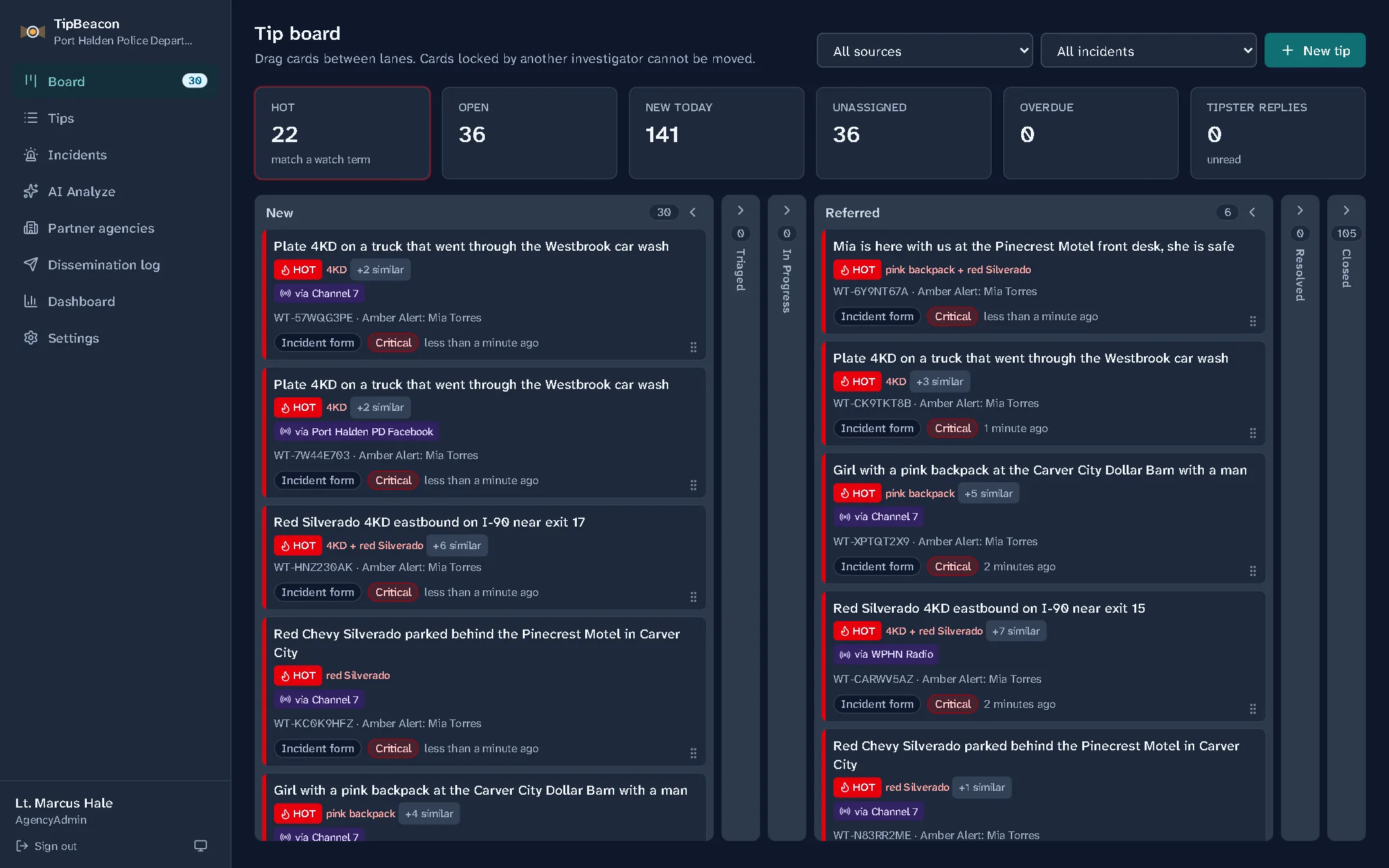
The TipBeacon board during an Amber Alert: tips that mention the suspect's plate, truck or the child's backpack are marked hot and sit at the top, each showing which TV station's link it came from.

Anonymous, and it stays that way

People stay quiet when they're afraid of being named. TipBeacon's public form tells them, in plain words, what it doesn't keep, and then keeps that promise.

  • No IP address, location or device details are stored. There's nowhere in the system to put them.
  • Tipsters get a reference number and a private code. With them they can check back, answer a detective's question or add a photo, still without a name.
  • A banner at the top of every page points anyone in danger to 911.
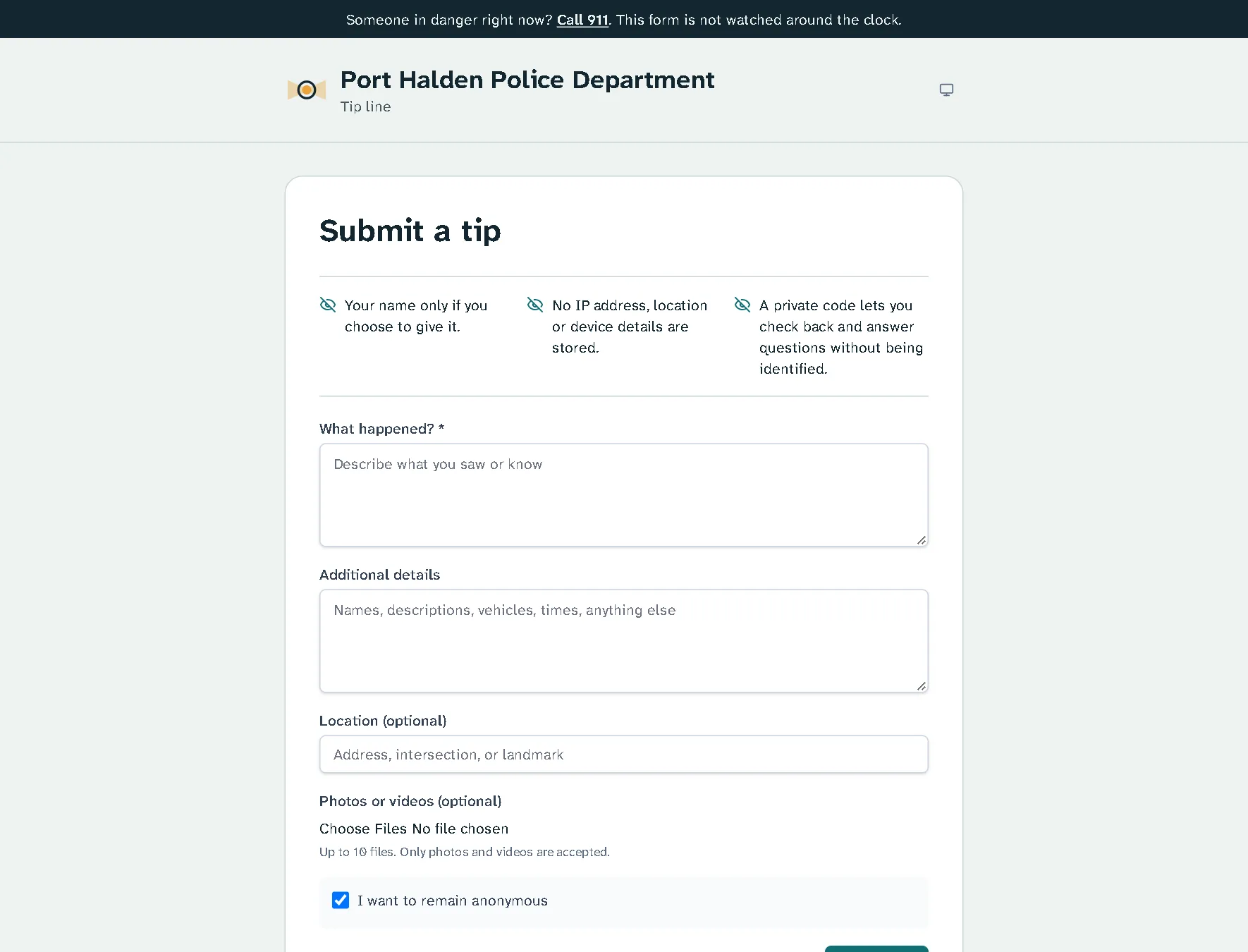
A department's public tip page: a 911 banner, the agency name, and three plain statements about what is not collected, above the tip form.

Built for the night everything comes in at once

When a TV station puts your QR code on the air, hundreds of tips can arrive in an hour. TipBeacon sorts them before anyone reads them.

  • Enter the plate, the vehicle and a name. Every tip that mentions one is marked hot and goes to the top.
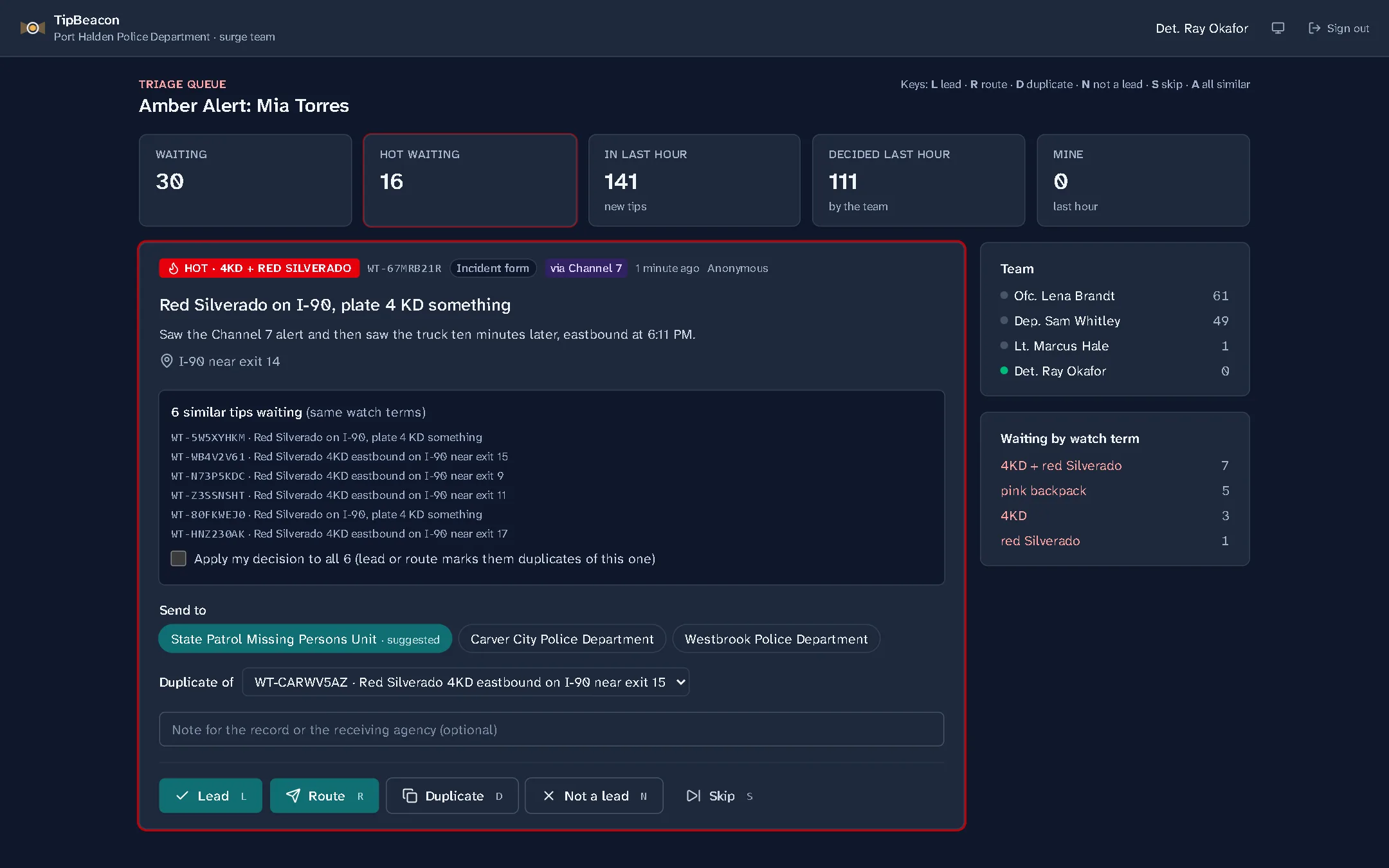
  • Tips that say the same thing are grouped, so one decision covers all of them.
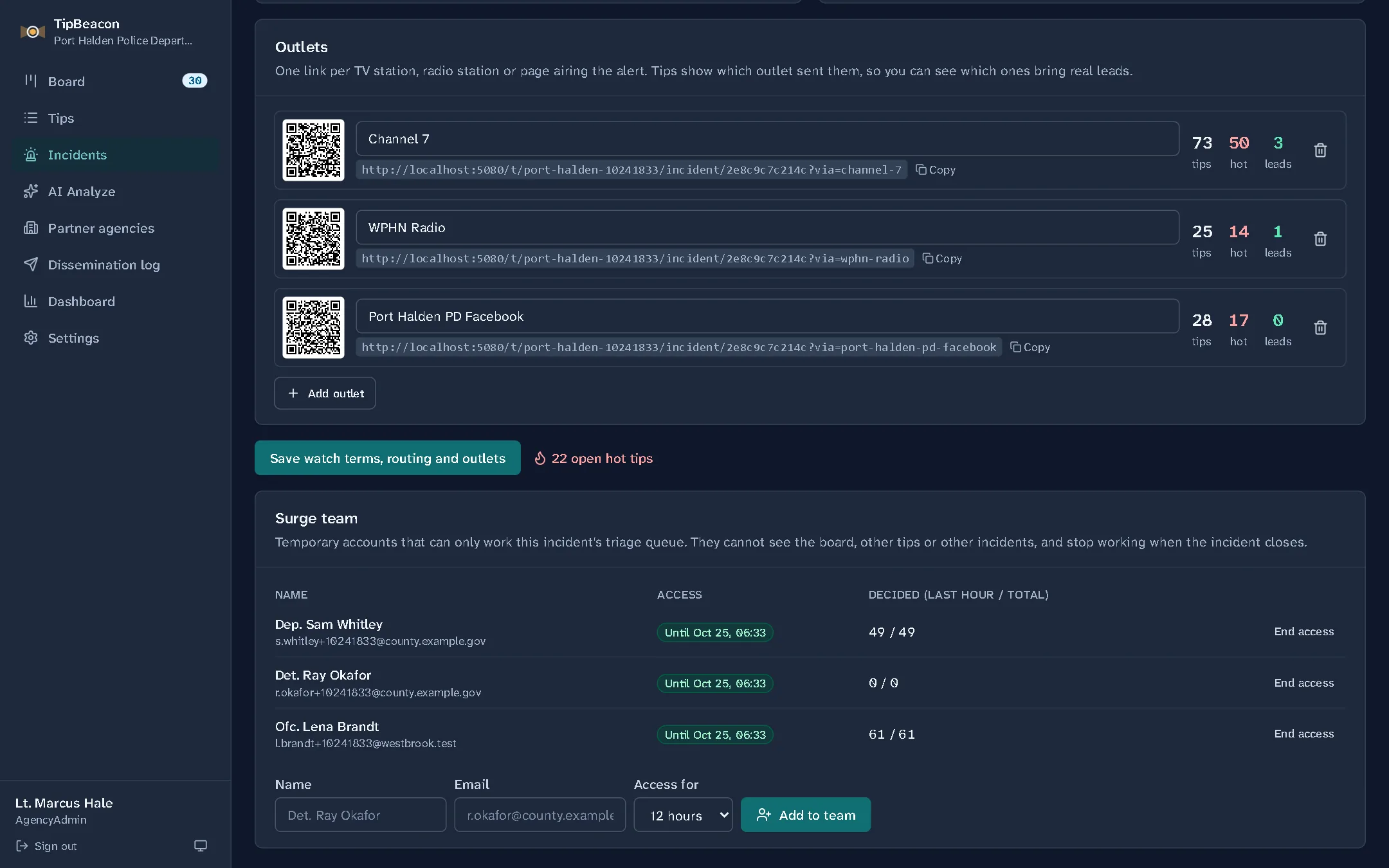
  • Borrowed officers get a temporary account that opens one thing: this incident's queue. It stops working when you close the incident.
  • Each station or page gets its own link, so afterwards you know which one brought the leads.
The triage queue a surge team member sees: one hot tip at a time, five similar tips that one decision can cover, the suggested agency to send it to, and one-key decisions.

Agencies working together

The lead that matters is often in the next town over. TipBeacon sends it there in one step and keeps the record.

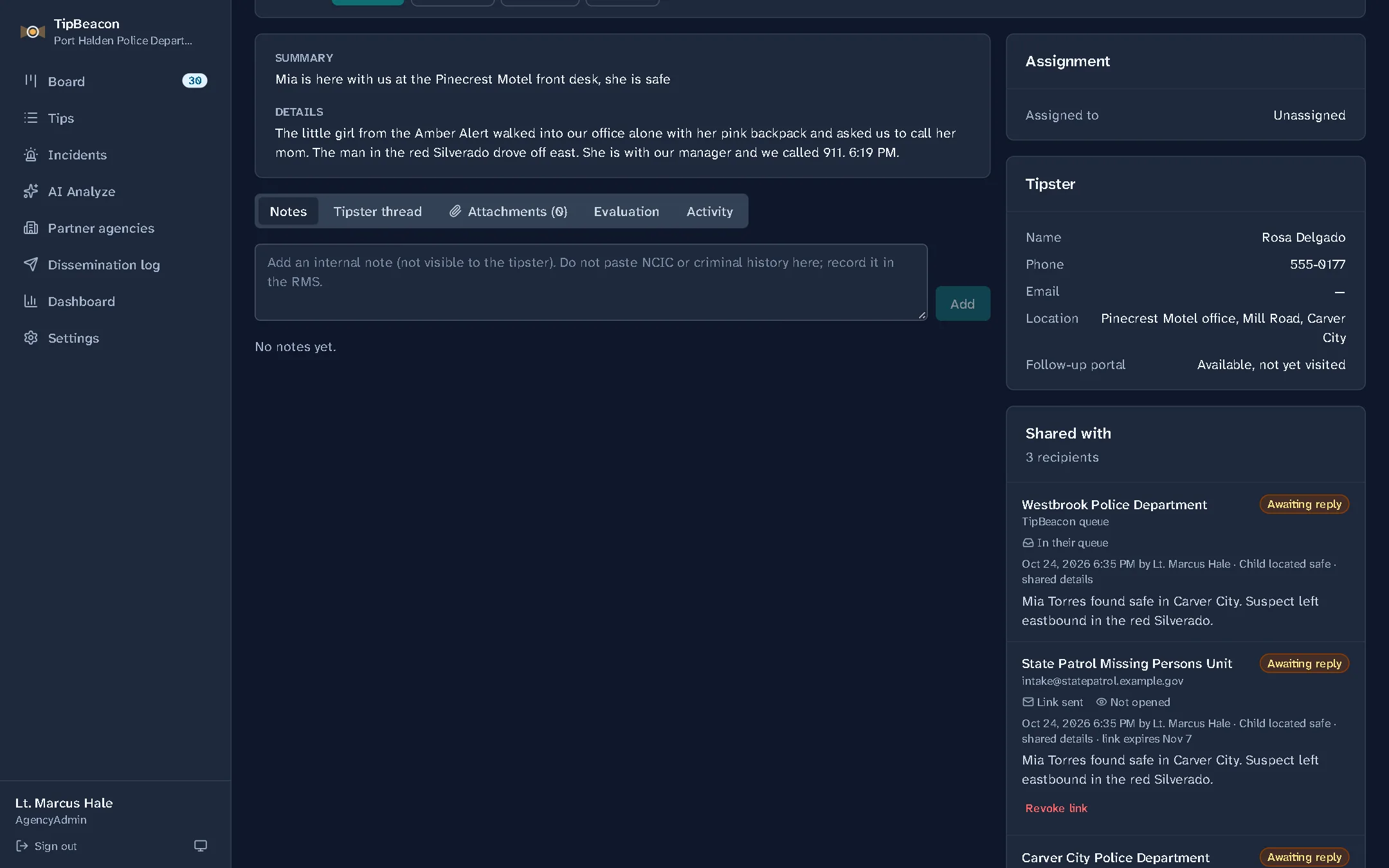
  • Agencies on TipBeacon get your tip straight into their own queue, and you see when they start working it.
  • Everyone else gets a secure link and a one-time code by email, never the tip itself in the message.
  • The dissemination log shows every tip that left your agency: to whom, by whom, what it included, and whether they opened it.
A tip shared with three agencies: one by queue, one by secure email link, each with its own status.

Hands off to your records system, cleanly

When a tip becomes a case, TipBeacon sends a signed package to your RMS and records the case number that comes back. That number is the only thing that comes back: tips stay upstream of your CJIS systems.

No webhook yet? Download the package and type the case number in. Either way, the hand-off is on the tip's timeline and in the audit log.

Set up in an afternoon

  • Build your own forms, such as drug activity or school safety, with follow-up questions that only appear when they apply.
  • Every form and incident gets a link and a QR code for flyers, patrol cars and social media.
  • Connect the tip mailboxes you already have. Emails become tips, and only photos and video get through as attachments.
  • Staff sign in with multi-factor authentication, and every read and change is in the audit log.
An incident's station links, each with its own QR code and counts of tips, hot tips and leads, above the incident's temporary surge team.

Watch it work

Short narrated walk-throughs with fictional agencies and tips. Each one plays here, with sound.

A day on the tip line

  • A tip from someone afraid to be named 1:28

    A student reports a planned fight anonymously and gets a code, not a name.

  • An email becomes a tip 1:07

    A hit-and-run report arrives by email. Only the photo gets through.

  • From tip to case 1:25

    Triage, assign and score a neighbor's tip about stolen tools.

  • Find any tip 1:17

    Search every tip, then filter to the shift's short list.

  • Set up a tip line 1:43

    A greeting, a drug activity form, and its link and QR code.

When everything comes in at once

  • An Amber Alert 2:33

    Hundreds of tips after a TV station airs the code, sorted before anyone reads them.

  • A Silver Alert across three towns 1:53

    A missing man with dementia, found by agencies sharing what they each have.

  • A shooting on campus 2:45

    A quiet tip board fills up in minutes, and the leads rise to the top.

  • One incident, one tip form 1:16

    Group a case's tips and publish a form just for it.

Working with other agencies

  • An ordinary Tuesday 1:39

    Share a lead with the town next door, then send it to the RMS.

  • Three cities, board to board 2:31

    A tip moves between agencies' boards, by email, and out as exports.

  • A lead for the sheriff 1:49

    A rifle on county land goes to the county by secure link.

  • Refer a tip 1:04

    The tip stays here, marked as referred, with a record of who got it.

  • Your partner agencies 0:55

    Add the departments, task forces and schools you hand tips to.

See it with your own tip line

We'll walk your team through a full day of tips, from the first anonymous message to a case number in your RMS.

Request a demo